
Key takeaways
- Social media analytics tools help you move from guesswork to strategy. They show what’s working, what’s not, and where to focus your budget.
- The best tools connect social activity to business outcomes. Think conversions, leads, and ROI, not just engagement metrics.
- Tools range from free native platform analytics to full social operating systems. The most complete options combine analytics, listening, publishing, and AI-powered insights in one workflow.
- Data is only useful if you can act on it. Look for tools with custom dashboards, cross-platform reporting, and integrations with your existing stack.
Social media analytics tools are apps and dashboards that let you gather information about your social media performance and your audience.
Tools for social media analytics also let you create reports to track key performance indicators in real time and over time, then present results to your team, your boss, and other stakeholders. They measure things like reach, engagement, follower growth, sentiment, conversions, and audience demographics, giving you a fuller picture than the numbers inside any single platform.

The 4 types of social media analytics
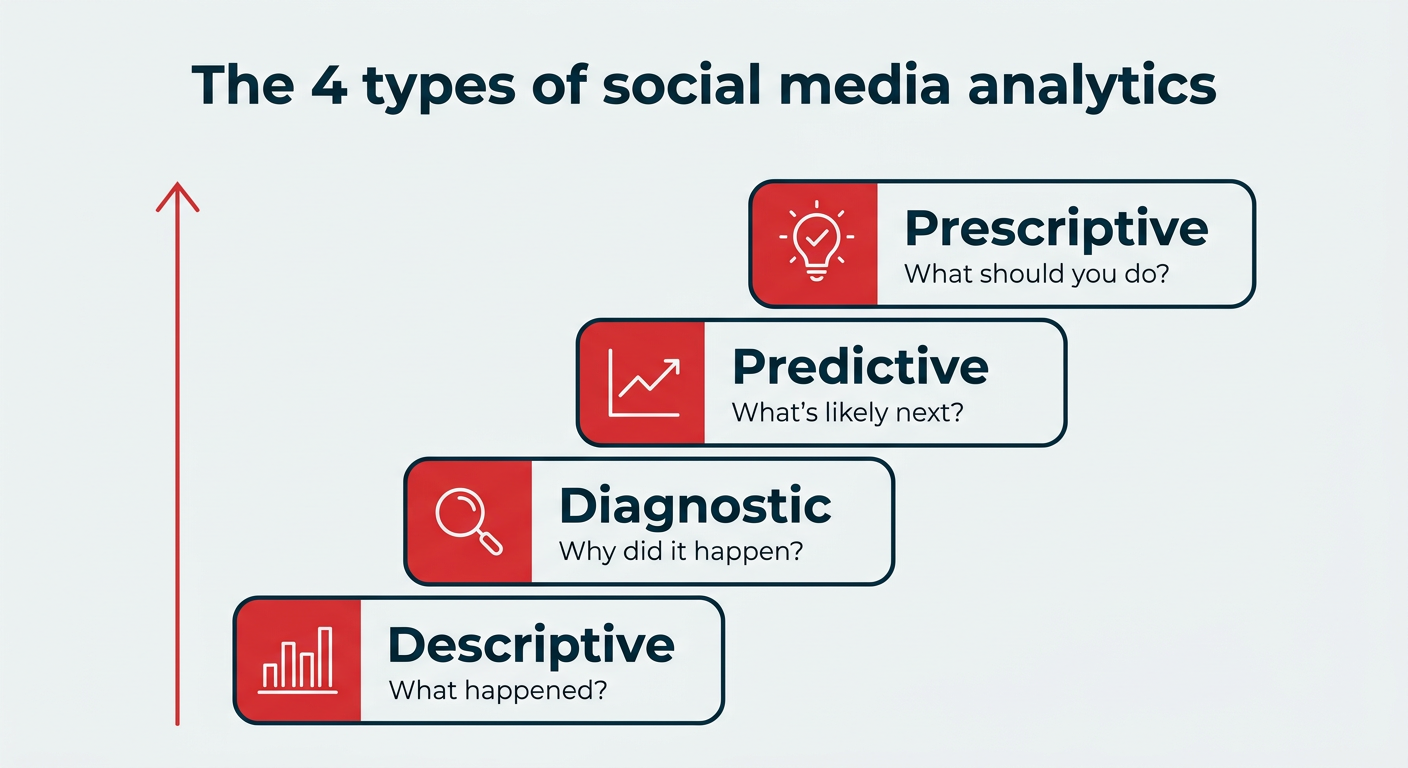
There are four types of social media analytics, and each one answers a different question about your performance. Together, they take you from understanding the past to deciding what to do next.
- Descriptive analytics: What happened? These are the core metrics like reach, engagement, and follower growth that summarize past performance.
- Diagnostic analytics: Why did it happen? This layer digs into the reasons behind the numbers, such as which content types or posting times drove a spike.
- Predictive analytics: What’s likely to happen next? Using historical data and trends, these tools forecast future outcomes like the best time to post or which content will perform.
- Prescriptive analytics: What should you do about it? This is the most advanced type, offering recommendations and next steps based on the data.
Most native platform tools stop at descriptive analytics. The strongest third-party tools reach into predictive and prescriptive territory, often with AI-powered insights that turn raw numbers into clear actions.
Analytics tools vs. reporting tools vs. management platforms
The difference comes down to how much each category does.
- Analytics-only tools like Rival IQ and Quintly focus purely on measuring and comparing data.
- Social media reporting tools center on visualization and client-facing reports built from a social media analytics dashboard.
- Management platforms like Hootsuite go furthest, combining analytics with publishing, listening, and customer care in one workflow.
Knowing which category you need helps you avoid paying for features you won’t use, or outgrowing a tool too quickly.
How to choose the right social media analytics tool
The right analytics tool should tell you what’s working, what’s not, and what to do next. Before you compare features, get clear on your team size, budget, and the channels you actually manage.
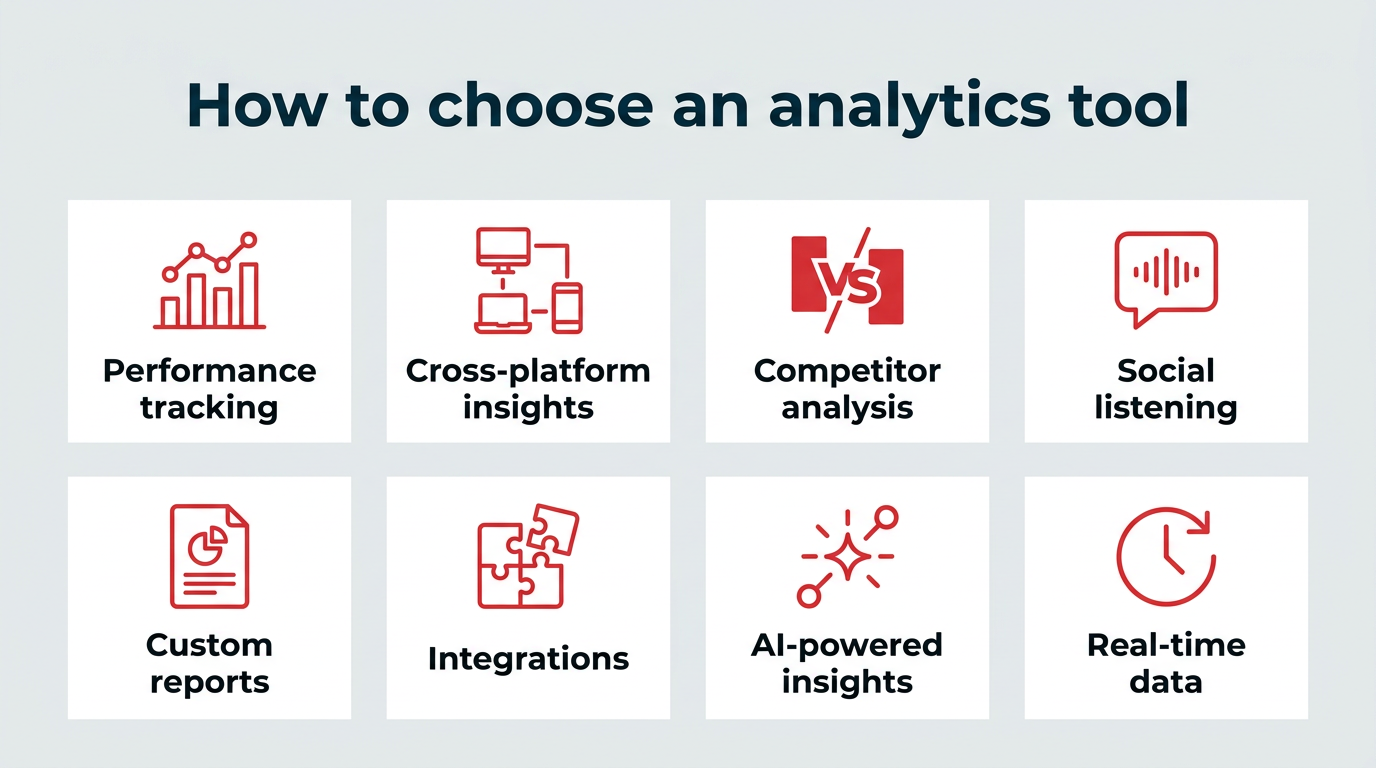
Here’s what to look for:
- Performance tracking: At a minimum, your tool should track key metrics like reach, engagement, follower growth, and conversions across your social channels. It should also let you zoom in on individual posts and zoom out to see long-term trends.
- Cross-platform insights: If your team manages multiple channels — 86% of marketers use Facebook, 82% use Instagram, and 72% use LinkedIn — you need a tool that pulls everything into one view. A cross-platform tool lets you compare performance across channels and see where your efforts are paying off.
- Competitor analysis: Choose a tool with built-in benchmarking so you can understand what others in your industry are doing and where you can differentiate your strategy.
- Social listening: Tools with listening capabilities help you track brand mentions, sentiment, and trends, giving you a clearer picture of how people feel about your brand.
- Custom reports and dashboards: Your tool should let you build custom dashboards and stakeholder-ready reports. This makes it easier to share insights, align teams, and prove impact.
- Integrations: Your tool should integrate with your existing stack, from your CRM to design tools, and scale as your team grows.
- AI-powered insights: Look for tools that surface patterns and recommendations automatically, so you spend less time digging through data and more time acting on it.
- Real-time data: Fresh, up-to-date metrics let you react quickly to spikes, emerging trends, and campaigns while they’re still happening.
With those criteria in mind, let’s look at why analytics matter before comparing the tools.
Marketers need social media analytics tools to make smarter decisions and prove ROI, especially as U.S. social ad spending exceeds $120 billion in 2026.
These tools help you answer questions like:
- Is it worth it for my business to keep posting on Pinterest?
- What were our top posts on LinkedIn this year?
- Should we post more on Instagram next month?
- Which network drove the most brand awareness for our product launch?
- What kind of posts do my followers like to comment on?
That kind of clarity matters, especially when it’s time to defend your budget or ask for more resources.
Here’s an example: Before using Hootsuite, the University of Sydney struggled to build a consistent social presence. Measuring performance across multiple accounts was time-consuming and unclear.
With Hootsuite’s centralized analytics tool, the team was able to track overall strategy and measure performance at both the account and campaign level.
By integrating Hootsuite with Adobe Experience Manager, the university could also track the full student journey, from social engagement to prospective enrollment. That end-to-end visibility made it possible to clearly measure and prove ROI.
Summary: Analytics turns social media from a guessing game into a measurable, strategic channel that ties directly to business outcomes.
Comparison: Social media analytics tools
Here’s a quick breakdown of the top social media analytics tools and what each one does best.
| Tool | Best for | Standout feature | Pricing | Free/Paid |
|---|---|---|---|---|
| Perch by Hootsuite | Mid-size to enterprise teams | AI-powered best time to post recommendations | $99/user/mo | Paid |
| Lumen by Talkwalker | PR teams, enterprise teams | Monitoring conversations across 150M+ sources | Custom pricing | Paid |
| Sprout Social | Enterprise teams, agencies | Tagging system to analyze inbound/outbound message performance | $199/user | Paid |
| Buffer | Small teams, solopreneurs | Post performance tracking for Instagram | $6/mo | Paid |
| HubSpot | Enterprise teams | CRM integration that tracks social-driven leads and conversions | $890/mo | Paid |
| Later | Creators, small brands | Link in bio analytics | $25/mo | Paid |
| Rival IQ | Competitive-focused marketers | Head-to-head competitor performance reports | $239/mo | Paid |
| Brandwatch | Enterprise, research teams | Analyzes data from 100M+ sources to detect trends and sentiment | Custom pricing | Paid |
| Keyhole | Enterprise teams | Automated influencer campaign ROI reports | Custom pricing | Paid |
| Channelview Insights | YouTube-focused teams | Multi-channel YouTube reports (PDF/CSV) | $7.99/mo | Paid |
| Mentionlytics | PR, brand monitoring teams | Sentiment and share of voice in multiple languages | $69/mo | Paid |
| Panoramiq Insights | Instagram marketers | Detailed Instagram Story analytics | $7.99/mo | Paid |
| Quintly | Analytics-focused teams, agencies | Dashboards drawing from 500+ metrics | Custom pricing | Paid |
| Iconosquare | Solo entrepreneurs, SMBs | Reports that include social images | €33/mo | Paid |
1. Perch by Hootsuite

Best for: Medium-sized businesses, enterprises, and large marketing teams.
Standout feature: Custom recommendations for the best time to post on each social account based on your accounts’ metrics and historical data
Price: Starting at $99/user/month (Standard plan)
Skill level: Beginner to intermediate
Perch lets you easily track the performance of all your social channels and formats in one place, so you can replicate what works and get more engagement. It works across Facebook, Instagram, X (Twitter), LinkedIn, TikTok, Pinterest, and YouTube.
With Perch, you can track a wide range of social media metrics, including page, profile, follower, and video stats, and much more.

You can set up custom dashboards to see an overview of your most important KPIs at a glance, over a select period of time. Want to go deeper? You can also drill down into individual post performance anytime.
With Perch, you can also:
- Benchmark your performance against competitors or your industry as a whole
- Find out when your audience is most active online
- Segment your audience into meaningful groups
- View top-performing content
- Get personalized recommendations for the best times to post for each of your accounts
- Create custom, stakeholder-ready social media reports or visualization graphs
- Use Wisdom, Hootsuite’s social-first AI, to surface insights, summarize performance trends, and turn analytics into plain-language next steps for your team.

On top of all that, Hootsuite is the #1 2026 Best Software Product by G2. That’s thanks to thousands of reviews like this one:

Explore all the capabilities of Perch in more detail:
Still unsure which platform to choose? G2’s Summer 2025 Report ranked Hootsuite #1 for social listening. This G2 chart ranks the top social media suites:

Source: G2
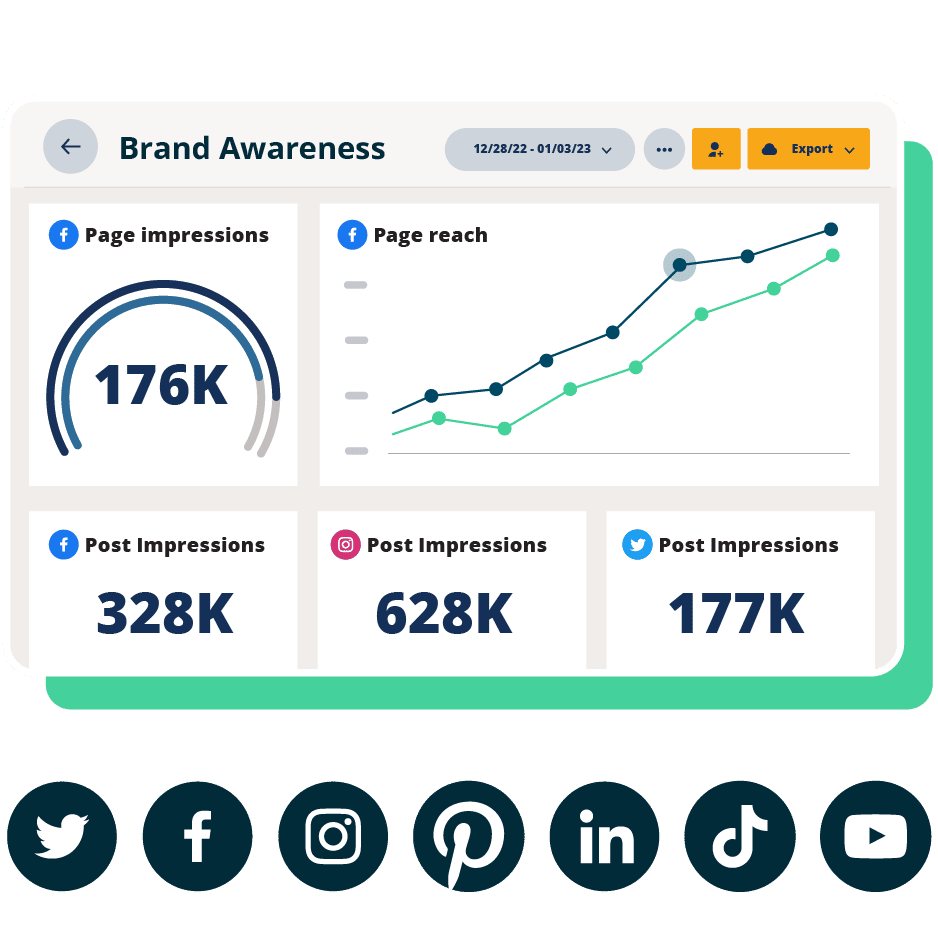
#1 Analytics Tool for Growth
Beautiful reports. Clear data. Actionable insights to help you grow faster.
2. Lumen

Best for: Social media managers, PR and communications teams, brand monitors, product marketers, researchers
Standout feature: Monitor conversations from more than 150 million sources to analyze engagement, potential reach, comments, sentiment, and emotions
Price: Pricing upon request – request a demo for more details
Skill level: Intermediate to advanced
Lumen is Hootsuite’s deep social listening and intelligence platform, helping brands track conversations happening beyond their owned channels, including:
- Mentions
- Brand sentiment analysis
- Influencer discovery
- Conversation clusters
You can filter by region, demographics, device, content type, and more. Lumen is especially useful for spotting activity peaks, sentiment shifts, and emerging conversations around your brand.
Where Perch measures how your own content performs, Lumen shows you the wider conversation, so together they give you the full intelligence picture. With coverage across 239 countries, it’s built for global brands that need to monitor sentiment at scale. Teams often lean on Lumen for crisis detection and competitive intelligence, catching a spike in negative sentiment or a rival’s campaign as it unfolds.
3. Sprout Social

Source: Sprout Social
Best for: Digital marketing teams at larger organizations
Standout feature: Tag inbound and outbound social messages to track and analyze volume and performance patterns.
Price: Starting at $199/seat/month (billed annually)
Skill level: Beginner to intermediate
Sprout Social is a social media management and analytics platform that helps brands track and measure their social media performance.
It offers analytics across all major social networks, with dashboards that track both paid and organic performance and help teams decide when to publish for the best results. You can also create and export white-labeled reports directly from the platform.
Sprout is typically more expensive than Hootsuite, and while it offers strong analytics, Hootsuite provides a broader range of features and integrations.
Learn more: Compare Hootsuite and Sprout to see which one works best for you.
4. Buffer

Source: Buffer
Best for: Small business owners who run their own social media, solo social media managers, and agencies
Standout feature: Simple Instagram post performance tracking, including Stories analytics
Price: Starting at $6/month for 1 social channel
Skill level: Beginner
Buffer is a social media scheduling tool that helps teams plan and publish social media content across Instagram, Facebook, X, TikTok, Pinterest, and LinkedIn.
When it comes to analytics, it’s more lightweight. It doesn’t cover every platform and lacks features like social listening or competitor analysis.
That said, Buffer is simple and easy to use, a good fit for teams that want to schedule content quickly without a lot of complexity.
Learn more: Read our guide to Hootsuite vs. Buffer for more on how these platforms compare.
5. HubSpot

Source: HubSpot
Best for: Marketing teams at larger companies focused on understanding how social impacts the full customer journey
Standout feature: CRM integration that tracks contacts and conversions driven by social
Price: Starting at $890/month
Skill level: Advanced
HubSpot is a marketing platform that combines social media management with email, SEO, and CRM tools.
That makes it a strong fit for brands focused on long-term customer relationships, not just social performance. You can track how social contributes to leads, conversions, and ongoing engagement across the funnel.
HubSpot integrates with Hootsuite to bring more social user context into your HubSpot CRM data and ticket system.
Learn more: You can add HubSpot to your Hootsuite dashboard
6. Later

Source: Later
Best for: Creators, influencers, and business owners who run their own social media, and solo social media managers at small-to-medium-sized businesses
Standout feature: Link in Bio page data flow to track website clicks from Instagram and TikTok
Price: Starting at $25/month
Skill level: Beginner to intermediate
Later is a social media scheduling and planning tool designed for teams that want to visualize and preview content before it goes live. It’s especially popular with smaller brands and creators, thanks to its visual content calendar and easy-to-use interface.
While Later does offer basic analytics and posting time optimization, it doesn’t include more advanced features like competitive analysis or industry benchmarking.
Learn more: Compare Later and Hootsuite to see which solution is best for you.
7. Rival IQ

Source: Rival IQ
Best for: Social media managers
Standout feature: Head-to-head reports against individual competitor accounts on Instagram, TikTok, Facebook, and X
Price: From $239 per month
Skill level: Intermediate
Rival IQ is a social media analytics tool that helps social media managers analyze data more effectively.
It gives you on-demand data, alerts, and automated reports across major social platforms, making it easy to run social media audits and competitive analysis. You can also break down performance at the post level, see what’s working (and why), and turn those insights into customizable reports.
Rival IQ isn’t just for the big picture. Its comprehensive social post analytics lets you see exactly which posts work for each platform and identify why they work.
Pro tip: Want to stay a step ahead of the competition? With Rival IQ you can analyze your competitors’ social media activity. See what works for them and look for ways to incorporate those techniques into your own social media strategy.
Learn more: Try a demo or start your free trial with Rival IQ
8. Brandwatch

Source: Brandwatch
Best for: PR and communications teams, social media marketers who focus on engagement rate and media monitoring
Standout feature: Track and analyze data from more than 100 million sources, including blogs, forums, and review sites, as well as social media networks
Price: Pricing available on request
Skill level: Beginner to intermediate
Brandwatch offers a powerful suite of tools that allow you to track and analyze your social media performance, brand reputation, and social share of voice.
It uses AI to surface relevant trends, sentiment shifts, and changes in conversation volume across more than 100 million sources. You can also set up alerts to stay on top of spikes in sentiment or engagement as they happen.
Learn more: See how Brandwatch compares to Hootsuite
9. Keyhole

Source: Keyhole
Best for: Enterprise-level businesses and organizations
Standout feature: Automate reports on influencer marketing campaigns with a breakdown of social media ROI
Price: Pricing available on request
Skill level: Intermediate to advanced
Keyhole is a social media analytics and influencer tracking tool built for in-depth campaign reporting and performance insights.
It helps you measure campaign performance, track brand mentions, analyze hashtag performance, and monitor influencer results. You can drill down into your impressions, reach, share of voice, and even analyze your competitors’ social media strategies.
If you’re using influencer marketing as part of your social content strategy, Keyhole has reporting capabilities that will let you identify the ideal influencers to work with and measure their performance over time to streamline your workflow.
Learn more: How to identify and work with the best influencers
10. Channelview Insights

Source: Synaptive
Best for: Marketers and creators managing YouTube alongside other social channels
Standout feature: Analyze the performance of multiple YouTube channels with exportable PDF and CSV reports
Price: Starting at $7.99/month
Skill level: All skill levels
Channelview Insights is a YouTube analytics tool that helps you track video and channel performance alongside your other social platforms.
It gives you a clear view of key metrics like views, engagement, watch time, and subscriber activity, along with deeper insights into audience demographics, geography, and traffic sources. You can also automate reports to keep your team updated without manual work.
Learn more: You can add Channelview Insights to your Hootsuite dashboard
11. Mentionlytics

Source: Mentionlytics
Best for: PR and communications teams, brand monitoring teams, product marketers, and researchers at small to medium-sized businesses.
Standout feature: Sentiment and share of voice analysis in multiple languages
Price: Starting at $69/month
Skill level: Beginner to intermediate
Mentionlytics is a social listening and brand monitoring tool that helps you track what’s being said about your brand across the web.
It’s a strong entry point for teams getting started with brand monitoring, especially those operating across multiple languages and regions. It’s also an effective tool for identifying influencers and tracking relevant hashtags tied to your industry.
Learn more: You can add Mentionlytics to your Hootsuite dashboard
12. Panoramiq Insights

Source: Synaptive
Best for: Instagram marketers and creators
Standout feature: Detailed Instagram Story analytics for multiple accounts
Price: Starting at $7.99/month
Skill level: All skill levels
Panoramiq Insights is an Instagram analytics tool designed to give deeper visibility into performance, especially for Stories.
Panoramiq Insights lets you:
- Analyze follower demographics, including age, gender, country, city, and language
- Monitor Instagram account activity (for multiple accounts), including views and new followers
- Discover your best social media posts with view and engagement analytics
- Measure Story views and interactions
Learn more: You can add Panoramiq Insights to your Hootsuite dashboard
13. Quintly

Source: Quintly
Best for: Social media managers at small-to-medium-sized businesses, enterprise-level companies, and agencies
Standout feature: Customizable dashboards that draw from more than 500 social media metrics
Price: Pricing available on request
Skill level: Intermediate to advanced
Unlike many of the tools on this list, Quintly is exclusively a social media analytics software tool. That means it’s built solely to provide top-quality analytics, rather than bundling analytics with other social media management capabilities.
Quintly provides detailed data and reports for Facebook, Instagram, X (Twitter), LinkedIn, YouTube, and Snapchat, along with competitor benchmarking.
Learn more: The social media metrics you need to track
14. Iconosquare

Source: Iconosquare
Best for: Solo entrepreneurs who manage their own social media accounts, social media managers at small-to-medium-sized businesses
Standout feature: Reports (in PDF or XLS) include social images for clearer reporting and analysis
Price: Starting at €33/month (billed annually)
Skill level: Beginner to intermediate
Iconosquare is a social media analytics tool built for tracking performance across multiple platforms.
It lets you monitor brand metrics across Instagram, Facebook, X (Twitter), LinkedIn, and TikTok, compare performance over time, and analyze more than 100 metrics through visual reports or raw data.
While you’re at it, you can benchmark your performance against your competitors and set your reports to arrive in your inbox on a regular schedule.
Free tools are a solid starting point, especially if you manage one or two channels or you’re just getting comfornalyze more than 100 metrics through visual reports or raw data.
While you’re at it, you can benchmark your performance against your competitors and set your reports to arrive in your inbox on a regular schedule.
Free tools are a solid starting point, especially if you manage one or two channels or you’re just getting comfortable with the data. The trade-off is that most only cover a single platform and lack cross-platform comparison and advanced reporting. Here’s how the top free options stack up.
| Tool | Platform | What it tracks | Limitations |
|---|---|---|---|
| Google Analytics | Your website | Social-driven traffic and conversions | Not a dedicated social tool |
| Meta Business Suite Insights | Facebook, Instagram | Account, platform, and post metrics | Meta platforms only |
| Instagram Insights | Reach, engagement, follower growth | One channel only | |
| TikTok Analytics | TikTok | Content and audience performance | One channel only |
| X Analytics | X | Organic and paid post performance | Requires X Premium |
| Pinterest Analytics | Impressions, saves, conversions | One channel only | |
| LinkedIn Page Analytics | Content, followers, visitors, leads | Page admins only |
15. Google Analytics

Source: Google
Best for: Social media professionals who work for a web-based business
Standout feature: See how much website traffic and leads flow to your website from your social media channels
Skill level: All skill levels
Google Analytics is a web analytics tool that helps you understand how social media drives traffic and conversions on your website.
While it’s not a dedicated social media analytics platform, it gives you critical insights like which channels drive the most traffic, what content leads to conversions, and who your audience is. You can also use it to measure the ROI of your social campaigns.
If your goal is to connect social performance to real business outcomes, Google Analytics can’t be ignored.
Learn more: How to use Google Analytics to track social media success
16. Meta Business Suite Insights

Source: Meta Business Suite
Best for: Social media marketers and creators on Meta platforms (e.g., Facebook and Instagram)
Skill level: Beginner to intermediate
Available to: Facebook Pages and Instagram professional accounts
Meta Business Suite Insights is the built-in analytics tool for tracking performance across Facebook and Instagram.
It gives you access to account-, platform-, and post-level metrics in one view, along with audience demographics and ad spend data so you can understand how your content and campaigns are performing.
Learn more: 12 Facebook analytics tools for better results in 2026
17. Instagram Insights

Source: Instagram
Best for: Social media marketers and creators on Instagram
Skill level: Beginner to intermediate
Available to: Business and creator accounts
Instagram Insights is the platform’s built-in analytics tool for tracking account and content performance across a network used by half of U.S. adults.
It gives you data on reach, engagement, and follower growth, along with insights into how people interact with your posts, Reels, and Stories. You can also explore audience demographics to better understand who you’re reaching.
Learn more: Guide to smarter results tracking on Instagram
18. TikTok Analytics

Source: TikTok
Best for: Social media marketers and creators on TikTok
Skill level: Beginner to intermediate
Available to: TikTok business accounts
TikTok Analytics is the platform’s built-in tool for tracking performance across your account and content.
It breaks metrics into clear sections — overview, content performance, and audience insights — so you can understand how your videos are performing and how your follower base is growing.
Learn more: 4 TikTok analytics tools
19. X Analytics

Source: X
Best for: Social media marketers and creators on X
Skill level: Beginner to intermediate
Available to: X Premium users
X Analytics is the platform’s built-in tool for tracking the performance of both organic and paid content.
It gives you a quick snapshot of what’s working, including top posts and top followers, while also helping you discover influencers who could amplify your content.
You can also dig into metrics like engagements and impressions over time to understand performance trends.
Learn more: How to use X analytics
20. Pinterest Analytics

Source: Pinterest
Best for: Social media marketers and creators on Pinterest
Skill level: Beginner to intermediate
Available to: Pinterest business accounts
Pinterest’s built-in free social media analysis tools help you understand your Pinterest audience’s interests. You can track key metrics for paid and organic Pins, including impressions, engagements, video views, and profile visits. You’ll also find Pinterest-specific stats like saves and closeups.
If you add the Pinterest tag to your website, you can use Pinterest Analytics to track conversions.
Learn more: A simple guide to using Pinterest Analytics
21. LinkedIn Page Analytics

Source: LinkedIn
Best for: Social media marketers and creators on LinkedIn
Skill level: Beginner to intermediate
Available to: LinkedIn Page admins
LinkedIn Page Analytics provides data on your LinkedIn content, followers, visitors, leads, and competitors. You can also track your employee advocacy efforts, engagement with your career page, and newsletter performance.
Learn more: LinkedIn Analytics: the complete guide for marketers
Tracking your social media metrics comes down to a repeatable five-step workflow that turns scattered data into decisions.
- Start with your goal, not the metric.
- Consolidate your data into one view.
- Look for the “why” behind the numbers.
- Set a review cadence.
- Build a repeatable report.
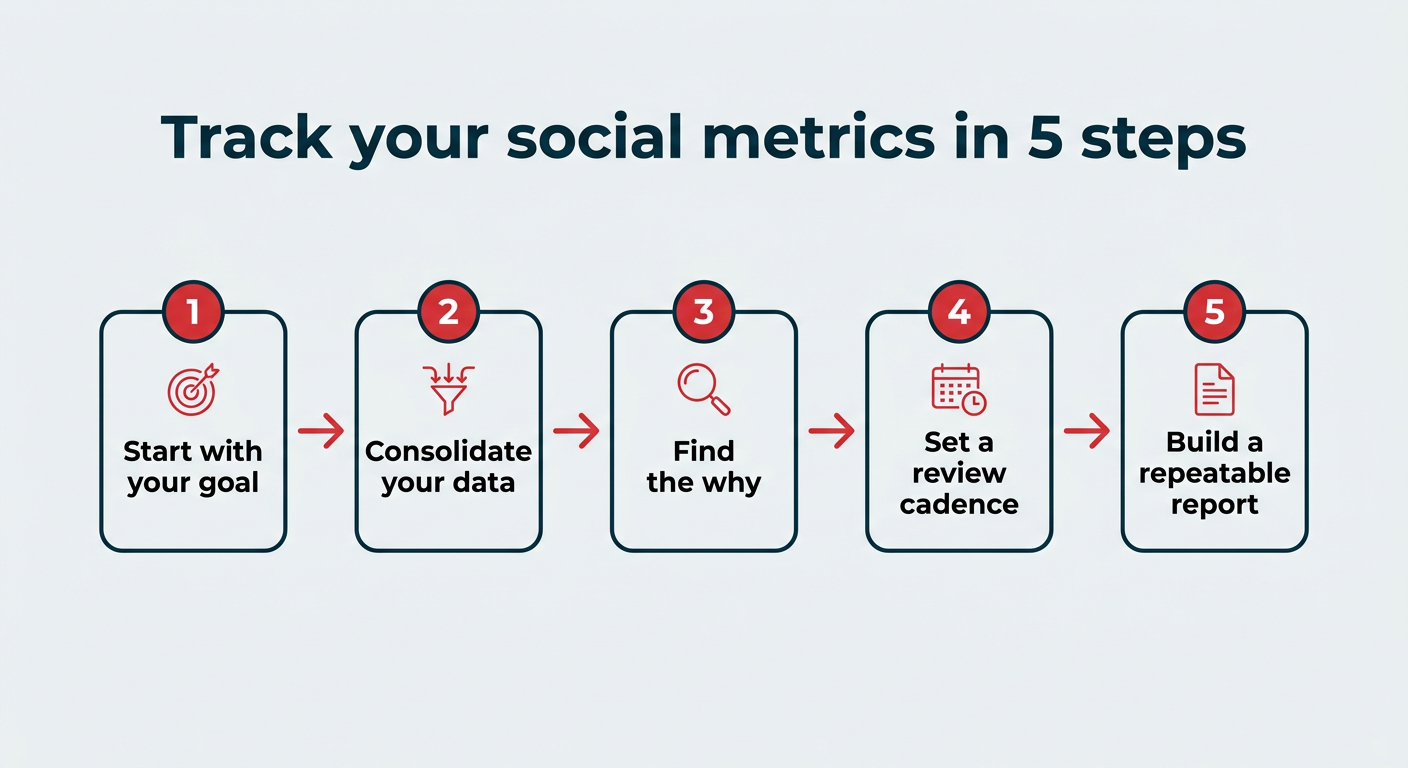
Here’s how each step works in practice.
1. Start with your goal, not the metric. Decide what you’re trying to achieve first, whether that’s brand awareness, leads, or community growth. Your goal tells you which metrics actually matter, so you’re not drowning in numbers that don’t move the needle.
2. Consolidate your data into one view. A tool like Perch by Hootsuite brings every channel into a single dashboard, so you can see cross-platform reporting at a glance.
3. Look for the “why” behind the numbers. A spike in engagement only helps if you understand what caused it. This is where Wisdom, Hootsuite’s social-first AI, earns its keep, surfacing patterns and turning them into plain-language explanations you can act on.
4. Set a review cadence. Decide how often to check in. Most teams do a light weekly review of core metrics and a deeper monthly or quarterly review to spot trends and adjust strategy.
5. Build a repeatable report. Create a template you can reuse each cycle so reporting takes minutes, not hours. Consistent formatting also makes it easier for stakeholders to track progress over time.
FAQ: Social media analytics tools
What are the best social media analytics tools for enterprise teams?
The best social media analytics tools for enterprise teams are those built into Hootsuite Social OS, including Perch and Lumen by Talkwalker. Hootsuite stands out because it connects analytics and scheduling in Perch, deeper listening in Lumen, and AI-powered insights through Wisdom, all in one social operating system.
How do social media analytics tools help measure ROI and performance?
Social media analytics tools measure ROI by connecting social activity to real business outcomes like conversions, leads, and revenue. They track metrics like reach, engagement, click-throughs, and conversions, then tie those results back to campaign costs to calculate return. The best tools also package this data into reports so teams can prove impact and justify budget.
What features should businesses look for in a social media analytics platform?
The most important features in a social media analytics platform are cross-channel reporting, customizable dashboards, and performance tracking tied to business goals. Strong tools also include competitive benchmarking, sentiment analysis, audience insights, and automated reporting.
How do analytics tools support reporting and decision-making at scale?
Analytics tools support decision-making by turning raw social data into clear, actionable insights. They aggregate data across social media platforms, surface trends, and generate stakeholder-ready reports. This makes it easier to spot what’s working, optimize social media campaigns faster, and align teams around the same performance metrics.
How do social media analytics tools compare across platforms and use cases?
Social media analytics tools vary based on depth, scope, and use case. Native tools like Instagram Insights or TikTok Analytics are great for platform-specific data, but they’re limited to one channel. Third-party tools like Perch by Hootsuite provide a cross-platform view, deeper insights, and more advanced reporting.
What is a social media analytics dashboard?
A social media analytics dashboard is a centralized view that pulls performance data from multiple social channels into one screen, so you can monitor metrics, spot trends, and share results without switching between platforms. It saves time and makes cross-platform comparison much easier.
What are the 4 types of social media analytics?
The four types of social media analytics are descriptive (what happened), diagnostic (why it happened), predictive (what’s likely to happen next), and prescriptive (what action to take). Most native tools cover descriptive analytics, while advanced platforms reach into predictive and prescriptive insights.
Do you need a social media analytics tool if platforms already provide data?
Native platform analytics are a good starting point, but they only show data for one channel at a time and lack cross-platform comparison, competitive benchmarking, and advanced reporting features. A dedicated tool consolidates everything into one view and ties results back to business goals.
How often should you check your social media analytics?
Most teams benefit from a weekly check on key metrics like engagement and reach, with a deeper monthly or quarterly review to assess trends, adjust strategy, and build stakeholder reports. The right cadence depends on how quickly your campaigns move.
What is the difference between social media analytics and social listening?
Social media analytics measures the performance of your own content and accounts, while social listening tracks broader conversations, brand mentions, sentiment, and trends happening across the web, including outside your owned channels. Used together, they give you both your performance and the wider context around your brand.
Save time managing your social media marketing strategy with Hootsuite. Publish and schedule posts, find relevant conversions, measure results, and more â all from one dashboard. Try it free today.