

Key takeaways
- Sentiment analysis tools use AI and natural language processing to classify brand mentions as positive, negative, or neutral across social platforms, forums, news, and reviews.
- The best tools go beyond basic polarity, detecting sarcasm, emotion, and intent to give teams a more accurate read on brand perception.
- Choosing the right tool depends on your team size, data sources, integration needs, and whether you need standalone listening or a connected social workflow.
- Hootsuite Social OS brings sentiment analysis, social listening, publishing, and reporting together through Lumen and Perch, so enterprise teams can spot shifts and act on them in one system.
What is a sentiment analysis tool?
A sentiment analysis tool is software that helps you collect and analyze the emotion behind how people talk about your brand online.
Instead of counting the number of mentions or comments, these tools analyze language, tone, and context to understand how people actually feel. Options range from standalone NLP platforms to sentiment features built into social media management suites, and they get used by marketing, PR, customer experience, and product teams alike.

Most sentiment analysis tools use AI and natural language processing (NLP) to do this at scale, making it possible to track sentiment across thousands of conversations in real time.
Bonus: Get a free social media sentiment report template to easily track audience sentiment over time.
How does sentiment analysis work?
Sentiment analysis tools use AI, machine learning, and natural language processing to find social mentions of your brand or products on dozens (or hundreds) of websites and apps. Then, they calculate a sentiment score in seconds.
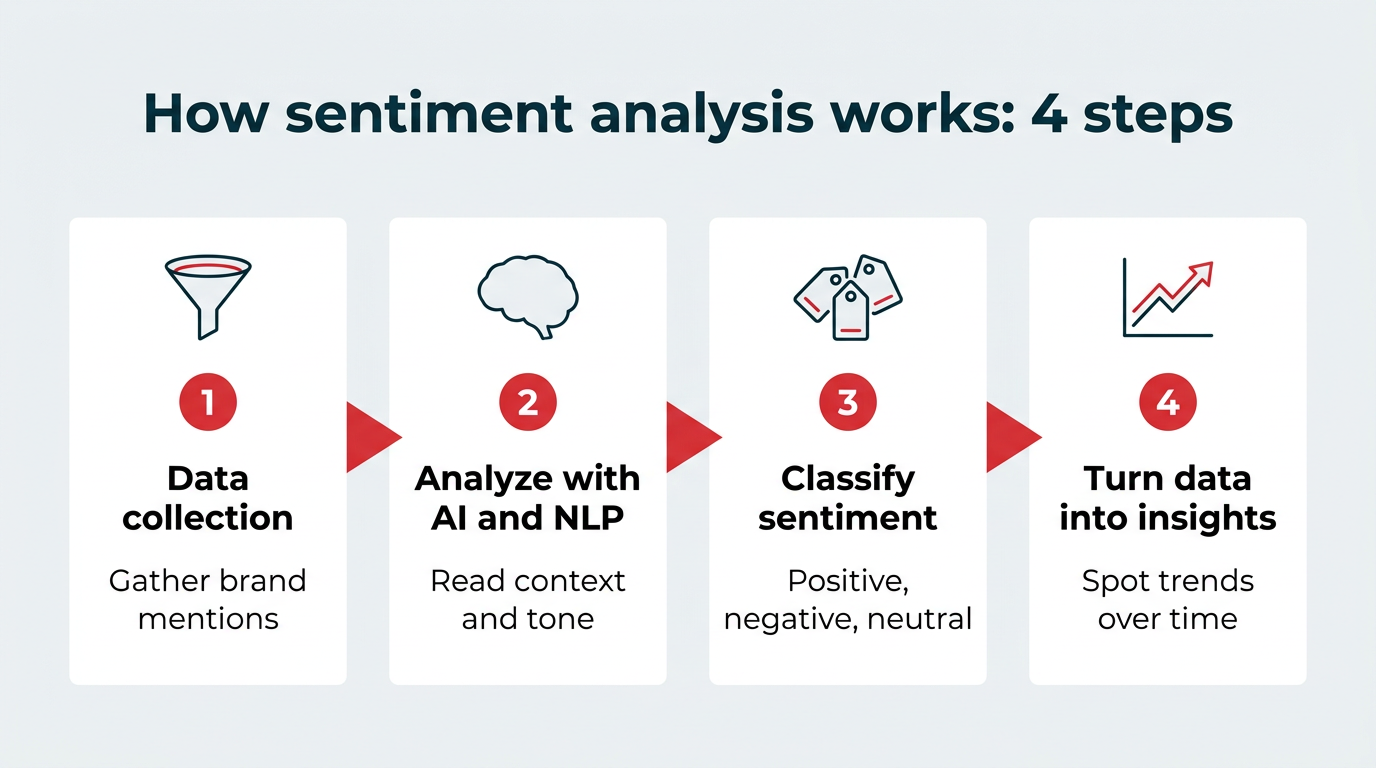
At a high level, social media sentiment analysis follows a four-step process:
- Data collection: First, the tool gathers mentions of your brand, products, or keywords from social media platforms, online reviews, forums, and blogs.
- Analyze language with AI and NLP: Next, AI models dig into the data itself. They look at context, phrasing, emojis, and the tone of each mention.
- Classify sentiment: Each mention gets labeled as positive, negative, or neutral. Many tools also add a sentiment score to show how strongly someone feels, whether it’s mild praise or full-on frustration.
- Turn data into insights: Finally, the tool pulls everything together. You can spot trends, recurring themes, influential voices, and how sentiment changes over time.
Not every tool gets to that score the same way. Older platforms lean on rule-based methods that match words against a predefined list of positive and negative terms.
Most modern tools use machine learning models trained on huge volumes of labeled text, and a growing number layer generative AI on top to summarize themes in plain language. This is part of an AI models and platforms market projected to reach $64 billion in 2026. Hybrid approaches combine rules for known edge cases with models for everything else.
One of the biggest advantages of sentiment analysis is seeing changes as they happen. Is your PR campaign lifting customer opinions of your brand? Did the latest recall leave your audience with a bad taste in their mouth? A sentiment analysis tool will tell you. The type of analysis you run shapes how much detail you get, which is what we’ll look at next.
What are the different types of sentiment analysis?
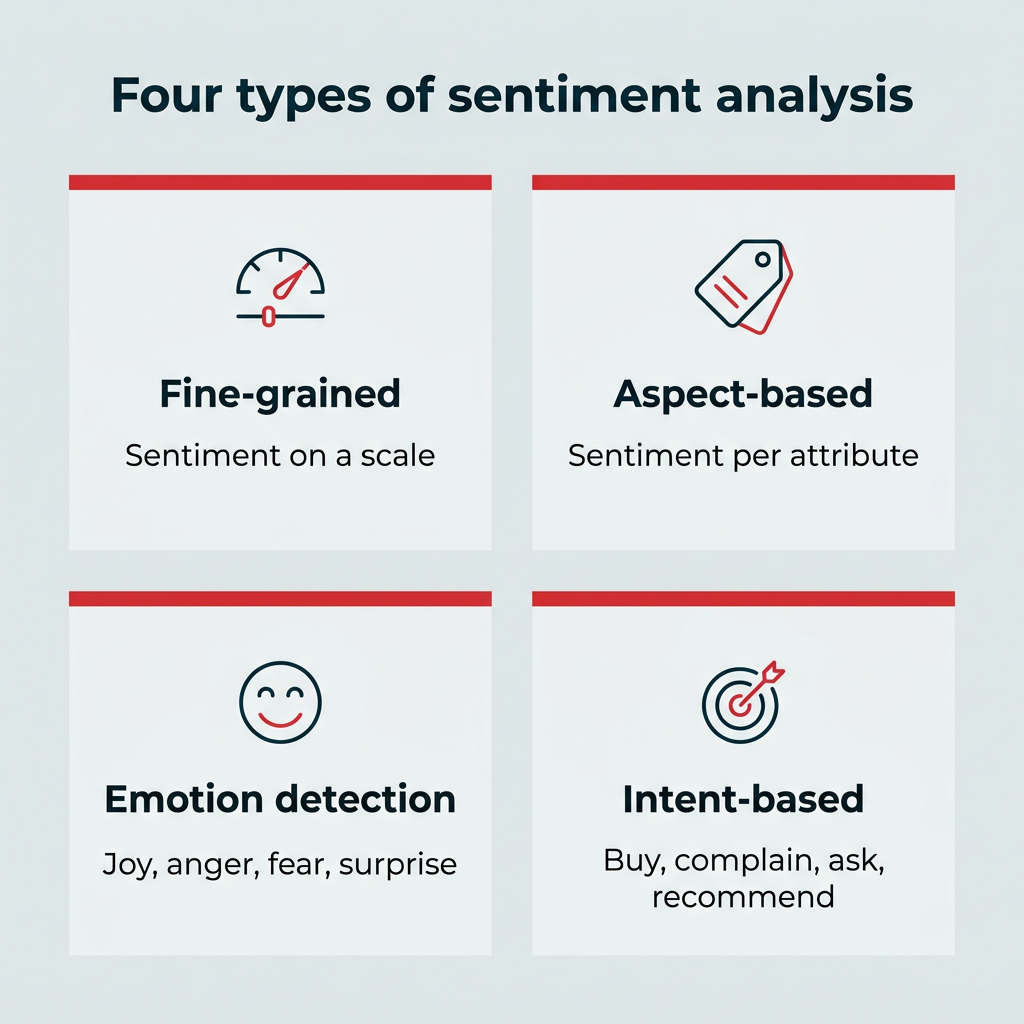
There are four main types of sentiment analysis, and each one answers a slightly different question. Knowing which type you need makes it much easier to shortlist tools, because not every platform supports all four.
Fine-grained sentiment analysis
Fine-grained analysis scores mentions on a scale rather than sorting them into three buckets. Instead of just “negative,” you’ll see the difference between mild disappointment and genuine anger. It’s useful when you need to track small shifts over time or map social sentiment against survey-style scores.
Aspect-based sentiment analysis
Aspect-based sentiment analysis breaks a single mention into the attributes it touches on: price, quality, shipping, support, and so on. That matters because one post can be positive about your product and negative about your delivery times. Product and customer experience teams get the most value here, since the output points directly at what to fix.
Emotion detection
Emotion detection goes past polarity to identify what people are actually feeling, like joy, anger, fear, or surprise. Several tools on this list include it, including Brand24, Meltwater, and Buffer. It’s especially handy during launches and crises, when a shift from surprise to anger tells you more than a dip in your overall score.
Intent-based sentiment analysis
Intent-based analysis looks at what the person wants next. A mention might signal purchase intent, a complaint, a question, or a recommendation, and each one belongs in a different queue. Teams use this to route conversations to sales or support instead of treating every mention as a marketing signal.
If you’re buying for an enterprise team, look for a tool that supports more than one of these types, since most real use cases span several at once.
What are the benefits of sentiment analysis tools?
Sentiment analysis can take you beyond vanity metrics by showing how people actually feel about your brand.
The biggest benefits include:
- Better understanding of brand perception: See whether conversations lean positive, negative, or neutral.
- Early warning signs of reputation issues: Catch sudden jumps in negative sentiment, which can signal PR problems or customer frustrations.
- Product feedback: Tracking sentiment can reveal what customers like or dislike, helping teams prioritize product improvements.
- Marketing optimization: Learn which messages connect with your audience so you can adjust messaging, creative, and timing.
- Better picture of campaign impact: Track how sentiment changes before, during, and after launches or announcements to see how your audience responded.
- Governance and audit support: Regulated teams get a documented record of what was said, when it was flagged, and how it was handled, which matters when legal or compliance reviews are involved.
- Cross-functional intelligence: Sentiment data gives product, CX, and comms teams a shared read on the same conversation, so decisions aren’t made from separate versions of the truth.
Together, these insights make it easier to understand your audience. You get clearer signals about what’s working, what’s not, and where to focus next.
How to choose the right sentiment analysis tool
Choosing a sentiment analysis tool comes down to matching the platform’s accuracy, coverage, and workflow fit to how your team actually works. Most buyers regret picking on price alone, then discovering the tool misses half their mentions or can’t hand insights off to anyone.
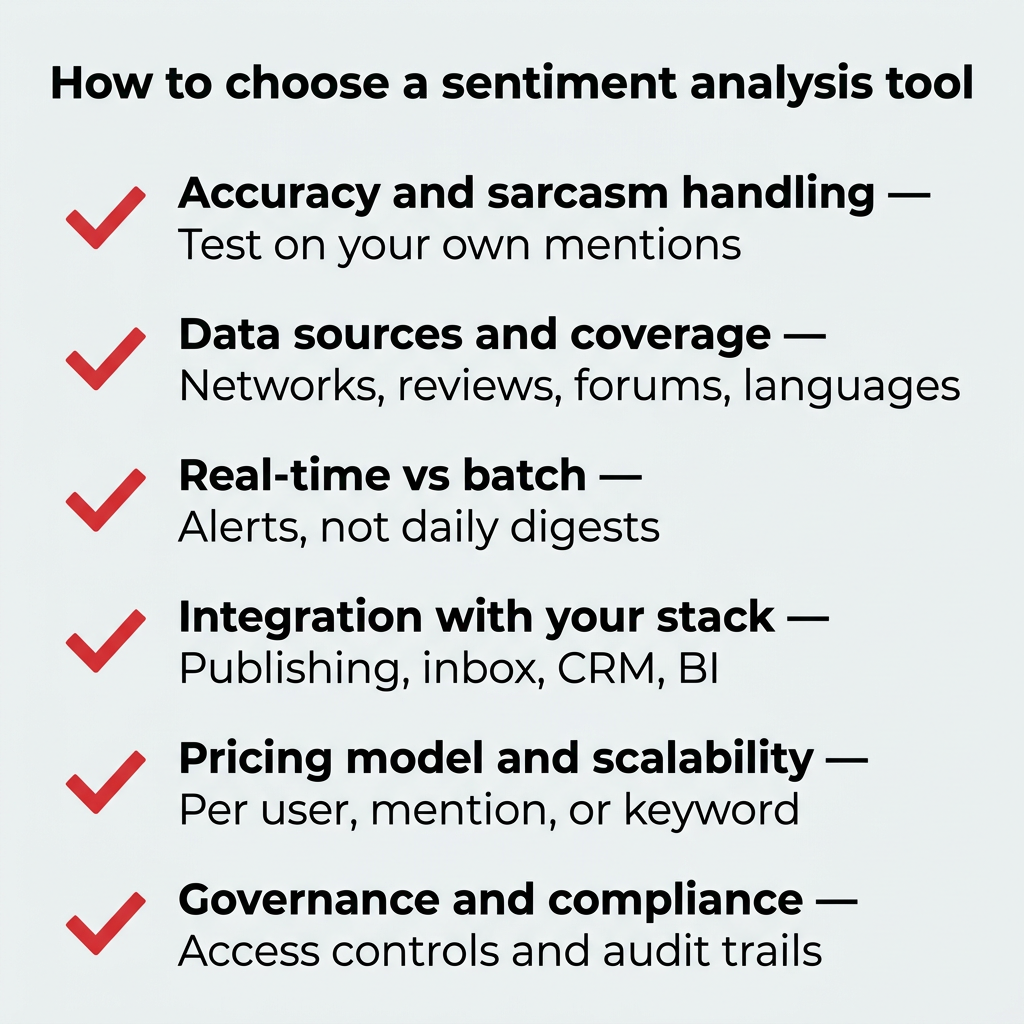
Here’s what to weigh before you commit:
- Accuracy and sarcasm handling: Ask how the vendor’s models handle sarcasm, slang, and negation, then test it on your own mentions during a trial. Sarcasm detection is where cheaper tools fall down fastest.
- Data sources and platform coverage: Check which social networks, review sites, forums, news outlets, and languages are included. A tool that misses the one forum your customers live on isn’t much use.
- Real-time versus batch analysis: If you need to catch a crisis as it builds, you need real-time monitoring and alerting, not a daily digest.
- Integration with your existing stack: Look at whether sentiment data flows into your publishing, inbox, CRM, and business intelligence tools, or stops inside a separate dashboard.
- Pricing model and scalability: Understand whether you’re paying per user, per mention, or per keyword, and what happens to the bill when volume spikes.
- Governance and compliance features: Enterprise teams should confirm access controls, approval workflows, data residency, and audit trails before signing.
A useful shortcut: if sentiment data needs to trigger action across several teams, prioritize integration and governance, especially as Gartner predicts 40% of enterprise apps will embed AI agents by late 2026. If you just need a read on brand perception, prioritize accuracy and source coverage.
Can ChatGPT or other LLMs do sentiment analysis?
Yes, ChatGPT and other large language models can perform sentiment analysis on text you paste in, and they’re often quite good at reading nuance in a single passage. Many commercial tools also use transformer models like BERT under the hood, so the underlying technology overlaps.
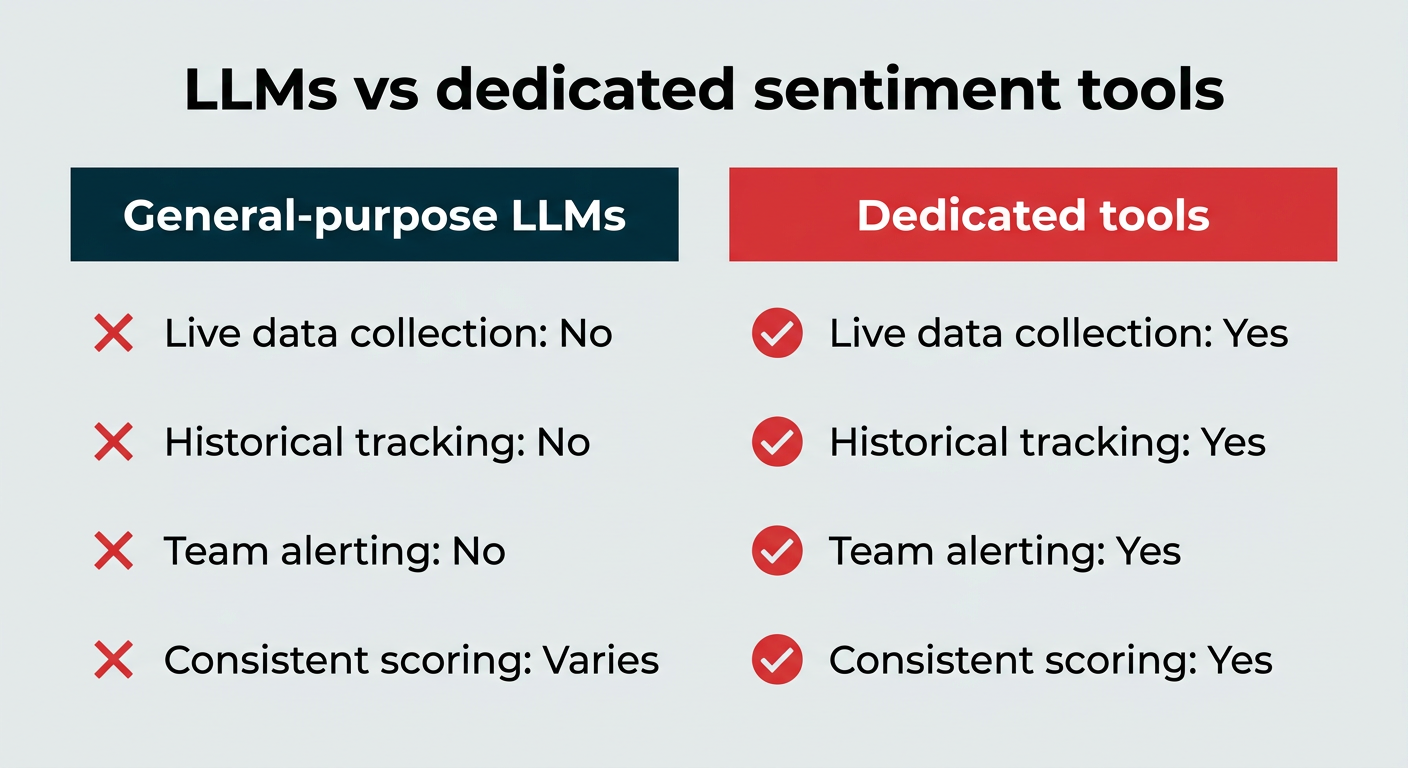
The gap is everything around the analysis. Here’s how the two approaches compare:
- General-purpose LLMs: Good for ad-hoc reads on text you already have. No live data collection, no historical tracking, no alerting, and results can vary between prompts.
- Dedicated sentiment analysis tools: Collect mentions continuously, score them consistently, track trends over months, alert your team, and keep a record of what happened.
For enterprise teams, the deciding factor is usually governance. Pasting customer conversations into a consumer chatbot creates data handling questions that most legal and security teams will not sign off on. Inside Wisdom, Hootsuite’s social-first AI, that same kind of analysis runs against live social data inside governed workflows, so insights connect to the people and processes that act on them.
Best sentiment analysis tools for 2026, compared
We’ve compiled the best sentiment analysis tools, from free options to enterprise platforms. Here’s how they compare:
| Tool | Best for | Platforms covered | Sarcasm and context handling | Free trial | Pricing |
|---|---|---|---|---|---|
| Perch by Hootsuite | Enterprise teams | Major social platforms | Strong | Yes | From $99/user/month |
| PR and marketing pros | Social, blogs, news, forums | Strong | Demo only | Contact for quote | |
| Multi-brand companies | Social, blogs, news, forums | Basic | Yes | From $199/month (billed annually) | |
| Multi-brand companies | Social, news, TV, radio | Strong | Demo only | Contact for quote | |
| Small teams | Major social platforms | Limited | Yes | From $5/month | |
| Small teams | Social, blogs, forums | Basic | Yes | From $29/month | |
| TikTok creators | TikTok only | Basic | Yes | From $400/month | |
| Influencers and creators | Social and hashtags | Limited | Demo only | Contact for pricing | |
| Agencies | Social and web sources | Basic | Yes | From $79/month | |
| Agencies | Social and web sources | Basic | Limited | From $69/month | |
| Quick one-off checks | Major social platforms | Limited | Free tool | Free | |
| Creators and beginners | Limited social platforms | Limited | Limited | Free |
Ratings below are our own, based on feature depth, ease of use, and value for money.
Best overall sentiment analysis tools
The best sentiment analysis tools use accurate AI, analyze conversations across platforms, and help teams understand brand sentiment at scale.
Let’s take a look at the best overall sentiment analysis tools:
1. Perch by Hootsuite
Hootsuite Social OS is a strong fit for teams that want to connect audience insights, content performance, and reporting in one place.
With Perch by Hootsuite, you can search brand mentions and trending topics across the web to see what people are posting about and commenting on. You can also track post performance across channels, compare results against industry benchmarks, and build reports that show what’s working.

Perch also connects with Wisdom, Hootsuite’s social-first AI, so teams can turn trending topics and audience insights into ready-to-review posts faster.
That makes Hootsuite especially useful for marketers who want to move from “what are people talking about?” to “what should we post next?” without separating listening, planning, publishing, and reporting into different workflows.
Who is it for?
- Large businesses and enterprises looking for a sentiment analysis tool that integrates with their overall social media management workflow.
- Brands that need to collect sentiment data from a large list of online locations.
- Brands that deal with thousands of mentions across many platforms and need to organize that data into easy-to-read reports.
Pricing:
- Plans start at $99/user/month for Standard, with a 14-day free trial. The Advanced plan is $249/user/month, and Enterprise pricing is custom.
Our rating: 5/5
Key features:
- Sentiment over time graph: It’s good to know what people say about you today. But the real magic happens when you see how that changes over time. If there’s a social media crisis brewing or your product launch is a huge hit, the trends from the sentiment-over-time graph will tell you.
- Share of emotion: I love that you can see how much of the online conversation about your brand leans towards a particular emotional tone like love, joy, or anger. That opinion mining gives you instant feedback to tell you how to approach your next online message.
- The Quick Search tool: You can see what people think of all types of topics, and the Quick Search tool makes that super easy. Just type whatever brand, keyword, or even event that interests you. It’ll even suggest a list of trending topics as you type.
Where there’s room for improvement:
- For deeper sentiment tracking across the social web, Lumen by Talkwalker is the stronger fit.
Customer review:

Source: G2

2. Lumen by Talkwalker
Lumen by Talkwalker is the standalone version of Hootsuite’s insights and listening platform, and it works as an all-around social media monitoring tool. It monitors 150 million websites and over 30 social media channels, including blogs, forums, online news sites, online reviews, and more.
So, for teams that need to know what’s said about them just about anywhere on the web, it’s a nice option.
The same technology powers Lumen, the integrated insights and listening app inside Hootsuite Social OS. As a standalone platform, Lumen by Talkwalker adds functionality like video engagement analysis, text analysis, and social listening tools.

Who is it for?
- PR and marketing pros that monitor sentiment from a large variety of places.
- Marketing teams who prefer an à la carte approach to social listening and sentiment analysis features and aren’t using Hootsuite.
Pricing:
- Lumen by Talkwalker doesn’t publish prices publicly.
Our rating: 5/5
Key features:
- Contextual understanding: People use sarcasm online a lot. I worry it can be lost on a piece of software that monitors moods. But the text analytics here actually understands basic sarcasm and knows how to categorize it in its analysis. So cool!
- Product sentiment breakdown: If you sell a product with several important attributes (like a flashlight people buy because of weight, brightness, and battery length), the product sentiment breakdown is a game changer. Say your overall sentiment is positive, but people think your flashlight is too darn heavy. You can publish a comparison to show it’s actually lighter than most competitors.
- The integrations: It’s really useful as a standalone tool, but the integrations make it so much more convenient. You can incorporate the data with over 100 platforms. If you already use Perch (or are thinking about it), you’ll get Lumen data natively in your dashboard.
Where there’s room for improvement:
- Expensive for very small teams: Since this is a standalone tool focused on social listening, it can be overkill for small marketing teams who might be better off with an all-in-one social media management tool that includes sentiment analysis capabilities (like Perch).
Customer review:

Source: G2
Sentiment analysis tools for multi-brand companies
If you manage several brands or a large product portfolio, you need tools that can separate conversations by brand and still roll them up into one view.
3. Brand24
Brand24 is a social listening platform that caters to multi-brand companies when they need to track thousands of mentions.
What really stands out about Brand24 is how it uses deep learning to help you understand the influence a mention has alongside its sentiment.

Source: Brand24
Who is it for?
- Enterprises that want to understand the footprint a positive or negative mention has left on their brand.
Pricing:
- The Individual plan costs $249/month ($199/month billed annually), while the Pro plan costs $499/month ($399/month billed annually).
- Brand24 currently offers a free 14-day, no-credit-card-required trial.
Our rating: 4/5
Key features:
- Influencer score and Estimated Social Media Reach (ESMR): Not every mention carries the same weight. Brand24’s algorithm tracks two unique metrics that help you understand each mention’s impact. Influence score tells you how popular the person or website that mentioned you is. ESMR shows how many people could have seen a mention containing a keyword (like your brand name) you’re tracking.
- Emoji analysis: If you’ve ever seen someone add a thumbs-down emoji to a sarcastic comment, you know what an important indicator those little images can be. That’s why I like that Brand24 gives you a whole emoji analysis. You get to see the counts of different emojis used in discussions of your brand, and you can click through to see the actual comments that use them. That helps a lot with sentiment classification.
- AI-generated reports: Have you ever had to generate a report for a large, very public brand that not only shows brand mention trends but also explains what they mean? It can take hours. These AI reports from Brand24 do all that in a few seconds.
Where there’s room for improvement:
- The text data you get from Brand24 is accurate overall, but it can misinterpret the attitude behind some mentions. That’s especially true when commenters use colloquial language.
- It doesn’t allow the muting of individual commenters. You can mute a platform, like Instagram, but removing some accounts from the analysis would occasionally be helpful.
Customer review:

Source: G2
4. Meltwater
Meltwater is a global media listening tool. It’s multilingual and pulls textual data from a ton of sources, including radio and TV broadcasts. It’s feature-rich and built on sophisticated machine-learning models.
What doesn’t come with all that power is affordability. Meltwater’s pricing plans will give all but the largest users sticker shock.

Source: Meltwater
Who is it for?
- Large, multinational companies that need to track sentiment and customer experience across several continents and understand its nuance in multiple languages.
Pricing:
- Meltwater offers several pricing tiers, along with feature add-ons that let you configure your own plan. They don’t publish prices publicly, and pricing is available only via a custom quote from their sales team.
Our rating: 4/5
Key features:
- Vast education library: Meltwater has built a huge library of step-by-step guides and video tutorials. They’re all free and really well organized.
- In-app AI insights: AI insights follow you around in Meltwater. Say you’ve entered a boolean search in the Brand Analytics chatbot, and then tapped the “Sentiment” tab. You’ll get real-time, AI-powered, actionable insights specific to the customer sentiment around that search.
- Emotional comparison graph: I like the way Meltwater presents emotional sentiment in a bar graph. Each bar represents an emotion, so you can visualize how many mentions show brand love vs. how many express fear or (gulp) hatred. It’s like getting customer feedback on an emotional level at scale.
Where there’s room for improvement:
- Meltwater has its own lexicon of terms (like “tab-level insights”). Add that to the many ways you can find and slice data, and the platform gets overwhelming quickly.
- The cost. I know you get a lot for the money, but most average brands will be priced out of using the platform.
Customer review:

Source: G2
Sentiment analysis tools for small teams
Smaller teams usually need sentiment basics bundled into a tool they already use, without an enterprise price tag attached.
5. Buffer
Buffer is a streamlined, budget-friendly social media scheduling platform that’s super easy to jump in and start using. That makes it ideal for small teams and business owners who run their social media on the side.
You won’t find a highly in-depth sentiment analysis feature set in Buffer or the most advanced sentiment analysis models. But it offers the basics in clear and understandable charts and lets you easily click through to find the mentions behind each chart.

Who is it for?
- Buffer is a good choice for freelancers, solopreneurs, and small marketing teams who just want general sentiment analysis along with their social media management tools.
Pricing:
- Buffer’s entry-level “Essentials” plan is $5/month per channel (billed annually).
- The Team plan will be enough for most small teams since it allows for unlimited team members for $10/month per channel (billed annually).
- You can get a 14-day free trial with no credit card needed.
Our rating: 4/5
Key features:
- Emotional analysis: When you look in your alert feed, you’ll see that each mention is tagged with one of six emotions. Many will be neutral, but you can scroll through to find ones that stand out (say you notice one “anger” tag among a bunch of surprise tags). It’s available on all plans, which is really nice for one-person teams.
- Quick click on charts to see mentions: I appreciate how easy it is to click around Buffer. For example, when you’re looking at a sentiment donut chart, you can click on the green “Positive” bar, and it’ll pull up a feed of the mentions that fall in that category.
- Quick Chart: Quick Chart lets you create a sentiment graph from any alert in about three clicks. Then, you can edit it for specific social media platforms, time periods, emotions, and sentiments. It’s great for adding snapshots to your monthly social media report.
Where there’s room for improvement:
- Sarcasm trips it up: Buffer’s machine learning algorithms can’t really differentiate between a sincere message and a snarky, sarcastic comment. It’s not a deal-breaker, given the price point, but it’s definitely something to be aware of if you use Buffer for sentiment analysis.
- Limited amount of insights: You do get what you pay for here. You’re limited to a couple of data points about sentiment and emotion in Buffer. It’s a nice addition, but it won’t replace the type of in-depth customer insights you can get from other tools like Lumen.
Customer review:

Source: G2
6. Awario
Awario is a dedicated brand monitoring tool at a decent price point that includes basic sentiment analysis tools. While it’s not the most robust option available, it does have some social selling analysis tools that are unique to this list.
All of that makes Awario a strong option for small teams that already have a social media management solution, especially those that sell through Facebook or Instagram.

Source: Awario
Who is it for?
- Budget-conscious teams of up to 10 people who just need the sentiment analysis basics (Awario does have an enterprise plan, but if you need unlimited users, you probably need a more complete sentiment analysis tool, too).
- Businesses and solopreneurs who already have an option for scheduling and managing social media posts and engagement.
Pricing:
- The Starter plan is $29/month (billed annually; approximately $49/month billed monthly) and covers one-person teams.
- The Pro plan supports up to 3 team members and costs $89/month (billed annually; approximately $149/month billed monthly).
Our rating: 3/5
Key features:
- Awario Leads: You can set up a specific type of alert that includes your brand, competitors’ brands, and multiple product descriptions (e.g., “fitness trackers”, “smartwatches,” and “activity tracker”). With that info, Awario uses AI to find leads from people complaining about your competitors’ products.
- Smart filters: If you’re monitoring keywords or brands that garner hundreds of mentions, smart filters let you magnify the ones that matter most. Let’s say you suspect a mini-crisis around your “SmarToe” sock brand; you can filter out positive and neutral sentiment mentions and focus only on reviewing the negative ones for that term.
Where there’s room for improvement:
- I really think Awario should let people use the sentiment analysis tool in the free trial.
- Since Awario is a dedicated social listening platform, a little more depth in the sentiment analysis, like tracking emojis or emotions, would be nice.
Customer review:

Source: G2
Sentiment analysis tools for creators and influencers
Creators tend to care less about enterprise reporting and more about proving impact to the brands they work with.
7. Exolyt
Exolyt is a sentiment analysis tool that monitors one platform: TikTok. So, it’s worth considering if you’re all in on TikTok and want the absolute most competitive insights and data (including sentiment tracking).

Source: Rob’s Exolyt account
Who is it for?
- Exolyt is a great option for creators who generate regular income from TikTok.
- TikTok influencers who want all the receipts to show how they’re helping the brands they work with.
Pricing:
- Exolyt has a free Basic plan, but it includes 0 social listening projects and no sentiment analysis features.
- The Essentials plan is $400/month, and sentiment analysis is included in the Advanced plan.
- Paid plans include a trial with no credit card required.
Our rating: 4.5/5
Key features:
- Competitor tracking: You don’t even have to put your own TikTok account into Exolyt. You can just monitor any account you compete with (or want to learn from) for some quick market research.
- UGC tracking: You can put a handful of topics (products, brand names, etc.) into Exolyt and it’ll show you the recent sentiment breakdown of user-generated content that references each one. You get that data as an overall percentage and as a change over time.
- Best and worst mentions: For any account you track in Exolyt, you can see the three mentions with the most positive sentiment and the three mentions with the most negative sentiment. It’s a great way to quickly note conversations that will stir up your followers.
Where there’s room for improvement:
- Obviously, I’d love to see a slightly more affordable plan that would let emerging creators get some of the sentiment analysis benefits of Exolyt.
- This isn’t really a flaw of the platform, but being so hyper-focused on just TikTok means other use cases will need additional tools to monitor other social networks.
Customer review:

Source: G2
8. Keyhole
Keyhole is a social media analytics tool that includes a nice suite of social media sentiment analysis features (no content creation or scheduling). I like it for influencers because it tracks hashtags and other creator accounts.

Source: Keyhole
Who is it for?
- Experienced creators and influencers who want to go beyond a sentiment overview and understand how people feel about certain topics and words.
Pricing:
- Keyhole doesn’t publish prices, but a few users say it’s on the pricey side.
Our rating: 4/5
Key features:
- Sentiment timeline: Imagine knowing when a conversation is hot so you can jump in, or being able to “read the room” and stay quiet until the collective angst subsides. The sentiment timeline helps you do it.
- Positive or negative word tracker: There’s a keywords box on the Keyhole sentiment dashboard that lists which words show up in polarizing posts. Maybe the word “price” shows up in the negative sentiment list, for example. That could indicate people are not too happy about the rising cost of whatever item you’re tracking, which could make for some spicy content.
Where there’s room for improvement:
- It would be great if you could see at least basic pricing upfront.
- I don’t think Keyhole’s artificial intelligence is as advanced as others on this list. It’s not great yet at understanding snark and sarcasm.
Customer review:

Source: G2
Sentiment analysis tools for agencies
Agencies have an extra requirement most brands don’t: separating client data cleanly and reporting on it without extra manual work.
9. Agorapulse
Agorapulse is a lightweight social media management platform that’s priced well for growing agencies. That means you won’t get the most advanced sentiment analysis tools out there, but they’re enough for most basic users.
Agorapulse also has some collaboration features that are ideal for working with clients.

Source: Agorapulse
Who is it for?
- Small and growing agencies that want a flexible plan that doesn’t force them to pay for more than they need.
- Agency pros who want to speed up client reporting.
Pricing:
- Paid plans start at $79 per user/month (billed annually), with a 30-day free trial and no credit card required, but most agencies will need to create a custom version they can scale as they grow.
Our rating: 3.5/5
Key features:
- Simple analytics: It may not be super powerful, but Agorapulse’s sentiment metrics are instantly populated in searches and clearly presented, so the learning curve is short.
- Number of sources: For the money, you get access to a lot of web and social media sources.
- Content type filters: Agorapulse has dropdown menus on each detailed search view that lets you pick which type of message, video, links, text only, or image, you want to analyze, which will show you where you can offer customer support.
Where there’s room for improvement:
- While it’s not bad for the money, other tools monitor sentiment from way more sources.
Customer review:

Source: G2
10. Mentionlytics
If you need a more full-featured brand monitoring and sentiment analysis tool without the social management piece, Mentionlytics should be on your shortlist.
Add in the platform’s customizable dashboards and reports, and the ability to add separate client accounts, and you’ve got a great solution for agencies to monitor customer satisfaction.

Source: Mentionlytics
Who is it for?
- Established agencies whose clients need in-depth listening and sentiment data and are willing to pay for it.
- Medium to larger agencies with a big client roster.
Pricing:
- Paid plans start at $69/month for the Basic plan and scale up through multiple higher tiers; check Mentionlytics’ official pricing page for the current tier names and prices.
Our rating: 4/5
Key features:
- Non-@ mention: People may talk about your brand without tagging your account or using a hashtag. Mentionlytics finds and reports on those non-@ mentions.
- Share of voice sentiment: There’s a share of voice chart that includes share of voice sentiment. So you get to see what share of positive, negative, and neutral mentions your clients’ brands command.
- White label reports: The ability to create customizable reports with your (or your client’s) branding is a must for agencies, and you can do that with Mentionlytics. You also get a Google Data Studio connector and APIs for other integrations to automate client reporting.
Where there’s room for improvement:
- A full-scale free trial would be nice. You can run a search on a particular brand or keyword for free, but it’s not the same as using the platform like an agency would for 30 days.
Customer review:

Source: G2
Best free sentiment analysis tools
If you’re testing the waters or just need a one-off read, these two free options will get you started.
11. Hootsuite brand sentiment analyzer
Sometimes, you just want a quick gut check of the overall sentiment for a single brand or topic right now. Or maybe you don’t yet have the budget for a tool like Lumen that tracks the sentiment for all of your keywords and hashtags over time.
Either way, the free Hootsuite brand sentiment analyzer covers the basics for you.

Who is it for?
- Anyone who just needs a quick idea of the sentiment surrounding a single topic right now.
Pricing:
Key feature:
- The simplicity and accessibility: There’s zero learning curve and nothing to confuse you with this free tool. Just type in your topic and get your sentiment review.
12. Social Searcher
Social Searcher is a basic social media listening tool. I’m not sure I would have included it on this list, except it has a free plan worth playing around with.
Unfortunately, you only get one brand/topic monitoring session per month. But it gives you a decent amount of feedback for that one term.

Source: Social Searcher
Who is it for?
- Businesses new to the world of social listening who want to see how it works.
- Someone who has a single topic or brand they want to run a quick sentiment analysis on.
Key feature:
- The individual sentiment graphs: I really like how Social Searcher splits out its sentiment graphs for each social network. It’s too bad you only get to use it once per month.
Common challenges in sentiment analysis
Even the best tools get things wrong sometimes, and it helps to know where. These are the three limitations that come up most often, and they’re worth testing during any trial.
Sarcasm and tone
Sarcasm and irony are still the hardest problems in sentiment analysis, because the words say one thing and the meaning says another. “Great, another outage” reads as positive to a basic model. Purpose-built models, like the ones behind Lumen, handle this better than general-purpose NLP, but no tool catches everything.
Negation and mixed sentiment
Negation flips meaning in ways simple keyword matching misses, so “not bad” gets scored as bad. Mixed sentiment is a related issue: a single post can praise your product and criticize your shipping in the same sentence. Aspect-based analysis is the fix, since it scores each attribute separately instead of averaging everything into one number.
Multilingual and regional nuance
Sentiment doesn’t translate cleanly. Slang, idioms, and regional norms around how directly people express criticism all shift how a mention should be scored. If you operate in multiple markets, ask vendors which languages their models are actually trained on, not just which languages they can detect.
Finding the right sentiment analysis tool is an important step. But it takes a little more elbow grease to increase reach and shift brand sentiment in your favor.
I’ve asked Ruth Kim, an experienced Social Media Consultant working with Rebrandly, for some tips on how to do it.
1. Set benchmarks
Your brand’s sentiment score doesn’t mean much without context. Set benchmarks by tracking sentiment over several weeks to establish your baseline, then compare against competitors or industry averages where available. This gives you a reference point to measure whether a shift is significant or just normal variation.
2. Respond to negative mentions quickly
Speed matters when addressing negative sentiment. Monitor alerts in real time and respond to complaints or concerns within hours, not days. A fast, empathetic reply can turn a frustrated customer into a brand advocate and shows others you’re listening.
3. Amplify positive conversations
Don’t just track positive sentiment. Share it, thank the people behind it, and use it in your content. User-generated content and testimonials carry more weight than branded messaging, and highlighting them encourages more of the same.
4. Close the loop with your team
Sentiment data is only useful if it drives action. Share insights with product, support, and marketing teams regularly. If customers consistently mention slow shipping or confusing checkout, those signals should reach the people who can fix them.
FAQ: Social media sentiment analysis
What is sentiment analysis in social media?
Sentiment analysis in social media is the process of using AI and natural language processing to categorize mentions of your brand, products, or topics as positive, negative, or neutral. It helps teams understand how people feel about their brand, not just how often they talk about it.
How accurate is sentiment analysis?
How accurate is sentiment analysis depends on the tool and the type of content being analyzed. Advanced platforms using machine learning models trained on large datasets typically achieve 70-85% accuracy, but accuracy drops when analyzing sarcasm, slang, or mixed sentiment. Testing a tool on your own mentions during a trial is the best way to evaluate accuracy for your use case.
Can sentiment analysis detect sarcasm?
Can sentiment analysis detect sarcasm? Some advanced tools can, but it remains one of the hardest challenges in sentiment analysis. Purpose-built models like those in Lumen and Perch handle sarcasm better than basic keyword-based systems, but no tool catches every instance. Always review flagged mentions manually when sarcasm detection matters.
What is the difference between sentiment analysis and social listening?
What is the difference between sentiment analysis and social listening? Social listening is the broader practice of monitoring online conversations about your brand, industry, or competitors. Sentiment analysis is one component of social listening that specifically measures the emotional tone behind those conversations. Most social listening platforms include sentiment analysis as a core feature.
How much does sentiment analysis software cost?
How much does sentiment analysis software cost varies widely based on features, data sources, and team size. Free tools like the Hootsuite brand sentiment analyzer offer basic one-off analysis. Entry-level paid tools start around $29-$79/month for small teams. Enterprise platforms like Lumen by Talkwalker and Meltwater require custom quotes and typically cost thousands per month, but include deep integrations, multilingual support, and advanced AI models.
Save time managing your social media marketing strategy with Hootsuite. Publish and schedule posts, find relevant conversions, measure results, and more â all from one dashboard. Try it free today.